









Not long ago, you could spot a scam message from its spelling mistakes and awkward grammar. That’s no longer reliable. Scammers now use AI tools to write polished messages, create realistic photos and even imitate voices. The good news is that the tricks scammers rely on haven’t changed, and once you know them, you can protect yourself even when the message looks perfect.
This guide covers what AI-powered scams look like, how to check a suspicious image, and what to do if you’ve been targeted.
Why AI has made scams harder to spot
AI tools let scammers do three things cheaply and quickly:
- Write convincing text in clean English, or in many other languages, with no obvious errors
- Generate fake images, such as fake ID photos, fake product photos or fake “proof” screenshots
- Imitate voices and faces, sometimes from just a short audio clip or a few photos taken from social media
The tools are new, but the goal is the same: get you to hurry, trust someone you shouldn’t and hand over money or information.
How to spot an AI-generated scam message
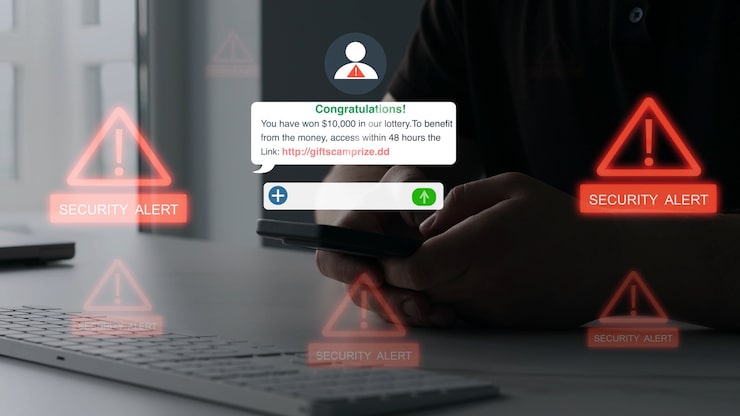
Since good grammar no longer proves a message is real, look at the behaviour of the message instead.
1. It creates urgency or fear.
“Your account will be closed in 30 minutes.” “Act now or lose your money.” Real companies rarely force you to decide instantly.
2. It asks for something sensitive.
No legitimate bank, mobile money provider or telecom company will ask for your PIN, password or one-time code (OTP) by SMS, WhatsApp or phone call. Ever.
3. It comes from an unexpected channel.
A “bank manager” messaging you on WhatsApp, or a “delivery company” texting from a personal number, is a warning sign.
4. It’s oddly generic, or oddly personal.
Some scam messages are vague (“Dear customer”). Others use details scraped from your social media to feel personal. If a stranger knows your name, your job and your recent holiday, that doesn’t make them trustworthy.
5. It’s too good to be true.
Guaranteed returns, “free” data, instant job offers with high pay and no interview, or a surprise prize you never entered for are all classic traps.
6. The link doesn’t match the sender.
Check the web address carefully. Scammers use lookalike domains, such as an extra letter or a different ending. If in doubt, don’t click. Go to the official website or app yourself.
Common scenario: You receive a message saying money was sent to your mobile money wallet “by mistake” and asking you to send it back. The confirmation message may look real, but it can be fake. Always check your balance through your network’s official USSD menu or app before sending anything.
How to spot a fake or AI-generated image
AI image tools are getting better, but they still make mistakes. Zoom in and look for these:
- Hands and fingers: extra fingers, merged fingers or strange positioning
- Text in the image: garbled, misspelled or meaningless letters on signs, labels and clothing
- Teeth, ears and jewellery: unnaturally uniform teeth, mismatched earrings or ears that look melted
- Backgrounds: warped objects, odd patterns or people in the background with distorted faces
- Lighting and shadows: shadows that fall in different directions, or a subject that looks “pasted in”
- Skin and hair: skin that looks overly smooth, like plastic, or hair strands that blend into the background
- Too perfect: flawless faces, perfect composition and no natural imperfections
Don’t rely on this list alone. The best tools improve fast, and some fakes have no visible flaws at all. Use the checks below too.
Simple ways to verify an image

- Do a reverse image search. Use Google Lens or TinEye to see where else the image appears. If a “local seller’s” photo shows up on ten different websites under different names, it’s stolen or fake.
- Check the source. Who posted it first? Is there a credible news outlet or official account behind it?
- Look for content credentials. Some images carry labels showing whether AI was used. This is not universal, and missing labels don’t prove an image is real.
- Search for the story. If a shocking photo is real, reputable outlets will usually report it. If only random social media pages share it, be suspicious.
- Ask for a live proof. If you’re dealing with a seller, ask for a fresh photo of the item with today’s date written on paper, or a quick video call.
Voice and video scams

Scammers can now imitate voices of friends and family, and sometimes fake video calls too.
How to protect yourself:
- If someone calls claiming to be a relative in an emergency and asking for money, hang up and call them back on their normal number.
- Agree on a family code word that only real family members would know.
- Be careful what you post publicly. Voice clips and videos on social media can be used to copy someone’s voice.
- If a “famous person” or “celebrity” is promoting an investment on video, be very suspicious. Fake endorsements are common.
What is an indication of an AI-generated scam message?
The clearest indications are urgency or pressure, a request for money, a PIN or a one-time code, and a message from an unexpected channel or sender. AI-generated scam messages often have perfect grammar, so judge the message by what it asks you to do, not by how well it’s written.
What to do if you think it’s a scam
- Stop. Don’t reply, click or send anything.
- Verify independently. Contact the company or person through an official number or website you already trust, not the one in the message.
- Never share your PIN, password or OTP.
- Block and report the number or account on the platform where it happened.
- If you’ve lost money, contact your bank or mobile money provider immediately, then report to the police or Ghana’s Cyber Security Authority. Check their official website for current reporting channels.
- Warn others. Scammers reuse the same scripts. Telling your family and friends can stop the next victim.
Quick checklist
Before you trust a message or image, ask yourself:
- Is someone rushing me?
- Are they asking for money, a PIN or a code?
- Did this come from an unexpected channel?
- Have I verified it through an official source?
- Does the image pass a reverse search?
If the answer to the first three is yes, or the last two is no, slow down and verify.
Final thoughts
AI has made scams more polished, but it hasn’t changed their core. Scammers still rely on pressure, secrecy and trust. If you stay calm, verify through official channels and never share your PIN or OTP, you’ll avoid most of them.
Have you or someone you know received a suspicious message recently? Share your experience in the comments, and let others know what to watch for.

[…] October 1, 2026 Top 10 Lenovo Laptops in 2026: Best Picks for Work, School, Gaming and Travel October 1, 2026 How to Spot AI-Generated Scam Messages and Fake Images (2026 Guide) […]
[…] October 1, 2026 Top 10 Lenovo Laptops in 2026: Best Picks for Work, School, Gaming and Travel October 1, 2026 How to Spot AI-Generated Scam Messages and Fake Images (2026 Guide) […]